Guide
How to measure how fast you kick a soccer ball
You can measure how fast you kick a soccer ball with just an iPhone. Film the kick from a still ball with the phone held steady, and Strikr works out how fast the ball left your foot from the video, in km/h or mph. It needs no radar gun and no sensor in the ball.
What you need
- An iPhone, running iOS 17 or later.
- A size 5 ball. Strikr takes its scale from the ball, and assumes the 22 cm of a size 5. A smaller ball, like a size 4 or a futsal ball, reads fast.
- Something to prop the phone on, a tripod, or your bag. The phone has to stay still.
- Strikr, from the App Store.
Step by step
Set the ball down and let it settle
Strike from a still ball: a set piece, a penalty or a shooting drill. Strikr measures the ball at rest before the strike, so a rolling ball or a moving camera won't measure well.
Prop the phone up, steady and level
Side-on to the kick or behind the ball both work. Lean the phone on a bag if you have no tripod; Strikr's camera shows a level line that turns yellow when the phone is level.
Frame the whole flight
Keep the ball big in the frame and in shot from the strike on. Film against trees, a fence or the net rather than open sky, and keep your feet in frame so Strikr can tell which foot struck the ball.
Film in Strikr, or import the clip
Strikr's camera records in slow motion where your iPhone supports it. A clip from Photos works too: for a Slo-mo clip, allow access to your photo library so Strikr reads the original rather than a slowed copy.
Read the numbers
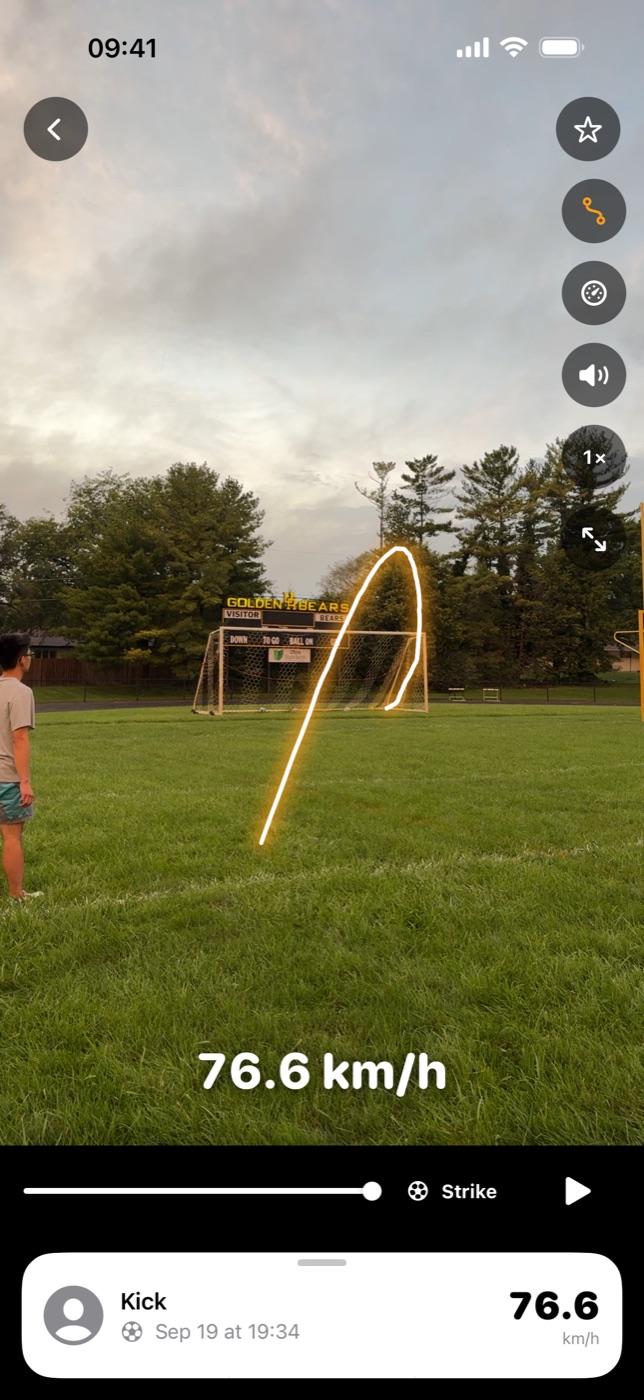
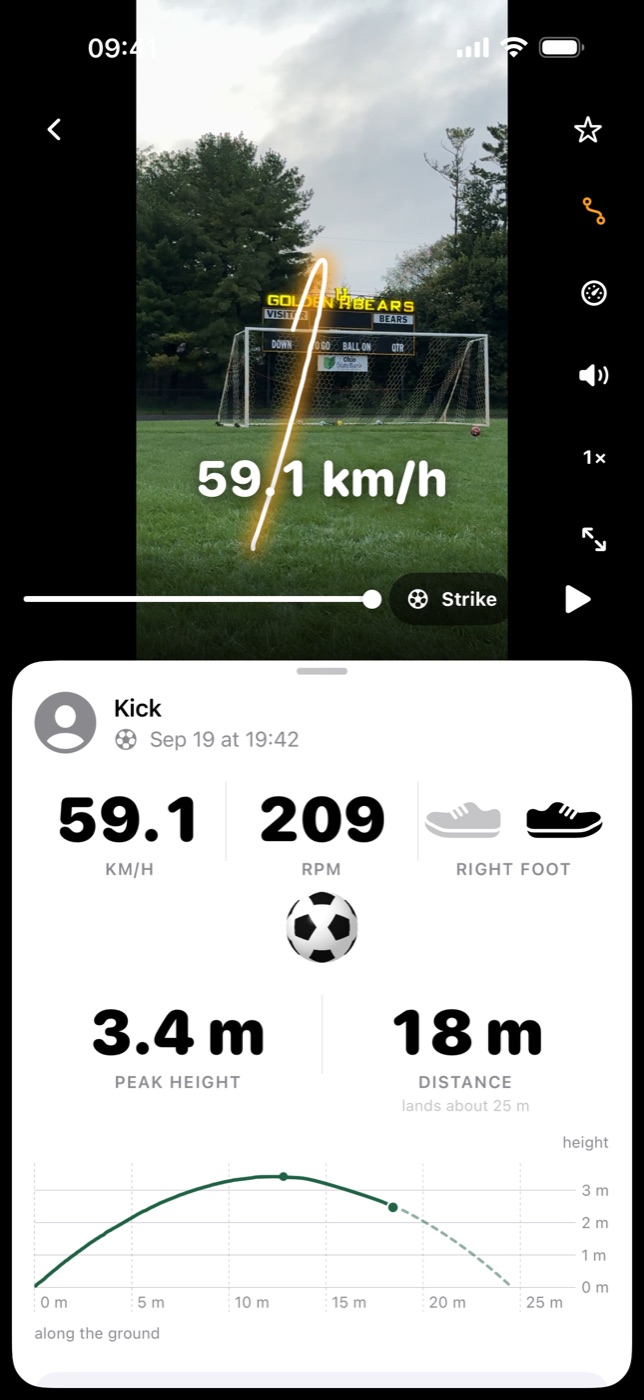
Strikr finds the ball and the moment of the strike, then shows how fast the ball left your foot, its spin in rpm when the ball's markings can be read, and the flight traced over the replay with its height and distance.
Film every session the same way
Same spot, same distance. Strikr charts your speed week by week and your left foot against your right, and your weeks compare best when the footage is alike.
How the speed is worked out
From the ball itself. A size 5 ball is 22 cm across, so the number of pixels it covers while it sits still tells Strikr how many pixels make a meter. As it flies, its size in each frame gives its distance from the camera, which is how a kick filmed from behind the ball, moving away rather than across, is still measured. The clip's own timestamps give the time between frames. Strikr fits the ball's path over the frames just after the strike and reports how fast it left your foot.
Spin is read differently: Strikr follows the ball's markings as it turns from one slow-motion frame to the next. A plain ball, or one too small or blurred to read, gets no spin number. Strikr says so instead of guessing.
What spoils a measurement
- The ball leaves the frame soon after the strike.
- The phone moves, pans to follow the ball, or is held at arm's length.
- Someone walks between the phone and the ball.
- The ball crosses open sky, where it is hard to follow.
- It's getting dark. Spin in particular needs daylight.
- The ball is a few pixels across: film closer, or zoom in.
When the footage isn't good enough to follow the ball, Strikr tells you what went wrong and how to film the next clip.
Questions
How can I measure my kick speed without a radar gun?
Film the kick on your iPhone and let Strikr measure it. A size 5 ball is 22 cm across, so its size in each frame tells Strikr how far away it is and how many pixels make a meter, and the clip's own timestamps give the time. Speed is distance over time, worked out on the phone.
How can I check my shot power?
Shot power is usually given as how fast the ball leaves your foot. Measure that: film a shot from a still ball with your iPhone held steady, and Strikr gives you its speed, spin, height and distance. Kick a few times a week and it charts your speed, foot by foot, so you can see whether it's going up.
What is a good kick speed?
It depends on age, the ball and the kind of kick, and there is no reliable public table of amateur kick speeds. As an example, five kicks by one adult recreational player, measured in Strikr, ran from 32.4 to 76.6 km/h (20.1 to 47.6 mph), and three of them carried 209 to 366 rpm of spin. The number worth watching is your own, and whether it's going up.
Does Strikr show km/h or mph?
Either. Tap the speed to switch. One mph is 1.609 km/h, so 100 km/h is 62.1 mph.
Do I need slow motion?
Speed can be measured from ordinary video, but slow motion gives Strikr more frames of the flight, and spin needs it: the ball turns too far between frames at 30 frames a second. Strikr's own camera films in slow motion where your iPhone supports it.
Can it measure a kick from match footage?
It's made for kicks from a still ball: set pieces, penalty kicks and shooting drills. Strikr takes its scale from the ball at rest, so a rolling ball or a phone that pans to follow it won't measure well.
Is there an Android version?
Not yet. Strikr is on iPhone for now.
What does it cost?
Measuring kicks takes Strikr Pro: $19.99 a year in the US, starting with 7 days free for new subscribers, or $5.99 a month. Prices vary by country. Cancel at least 24 hours before the 7 free days end and you won't be charged.
Measure your first kick.
Strikr is on the App Store for iPhone. The yearly plan starts with 7 days free for new subscribers, then $19.99 a year in the US unless you cancel.
Download on the App Store